
I Let AI Build a Tool to Help Me Figure Out What Was Waking Me Up at Night
I try to pay attention to the small things that affect my quality of life. When something keeps bothering me, I want to investigate, find a likely cause, and act on it.
What changed recently is what I'm willing to build to support that. With AI tooling, projects I would have dismissed a few years ago as "too much effort for the payoff" now fit into a weekend. So whenever I bump into a problem in my daily life, I catch myself thinking, "actually, I could build something to look into this".
This post is about one of those problems: my sleep.
The problem
I live in a noisy city. Some nights I wake up at 3 am with no idea what woke me up. Other nights I don't fully wake up, but my watch the next morning shows that something pulled me out of deep sleep at 3:32 am.
The frustrating part is that you almost never know what caused it. When a sound wakes you up, your brain is still transitioning out of whatever sleep stage you were in, and it takes a moment to come back online properly. By the time you can register what's happening, the noise is already gone. Unless it repeats (thunder, car alarm that won't stop) or leaves a clue afterwards (a flash of lightning following the boom), you wake up confused and the cause stays a mystery.
And without naming the cause, you can't fix it. Was it inside the flat? Outside? A neighbor? A truck? A door? Any "solution" you try is just a guess, and guessing tends to be expensive.
So I was on a mission 😏
What I built, at a high level
One bit of context first: I already have a smart home setup with Home Assistant and a bunch of sensors around the flat (motion, doors, lights, temperature, humidity, CO₂, air quality). A lot of the data I needed for this project was already being collected. I only had to add the audio piece, pull in my sleep data, and tie everything together.
I only needed to add a few things:
- Two cheap USB microphones, one inside the flat and one outside the window facing the street
- A Raspberry Pi (micro-computer) that listens, but only when I'm at home and in bed
- Sleep data from my Garmin* watch
- A web app on my home lab that combines the audio, the sleep data, and the existing sensor events
When the Pi hears something loud enough to be interesting, it saves a short clip with a few seconds of context before and after. The whole detection mode is gated by Home Assistant: the Pi exposes itself as a Home Assistant integration, and an automation only switches it on when I'm at home, in bed, and around my usual sleep time. Outside of those conditions, it's completely disabled, no microphone access at all. That's the behavior I wanted, even on my own home network.
The web app is where the actual usefulness happens. Each night is laid out like tracks in a music editor: one for sleep stages, one for heart rate and HRV, a few for the sensor events, and one for the noise events with the audio loaded in.
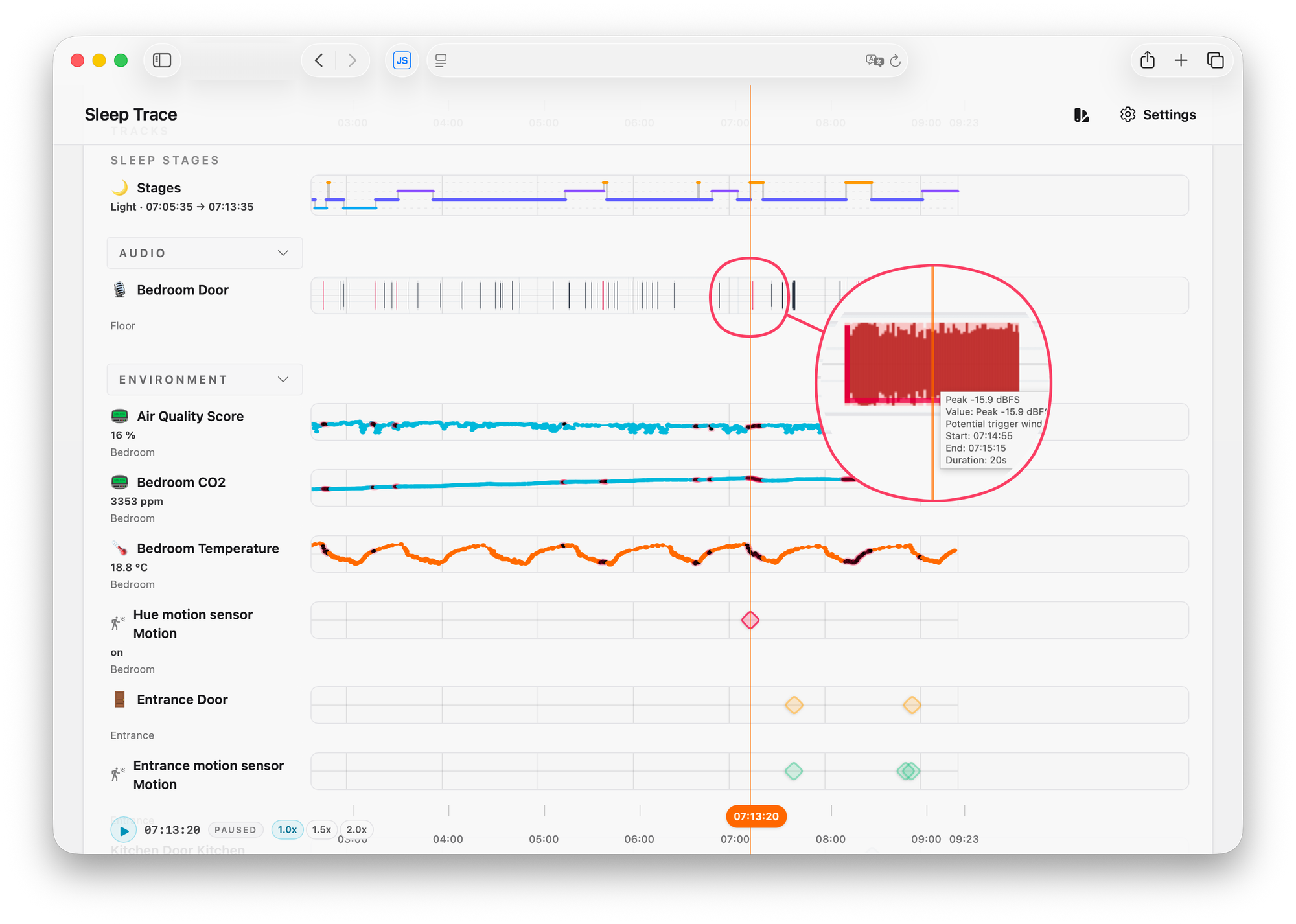
The most useful feature, by far, is how it visually marks the moments where my sleep stage shifted or I woke up. That's the entry point. I scan a night, find the highlighted moments (in red), and click to listen.
One more nice touch: the frontend is a progressive web app with web push, served only inside my home network. The moment I wake up and check my phone, I get a notification that last night's data is ready to review. Nothing leaves the network, which I really like.
What AI did, and what it didn't
To set expectations clearly: AI is what made it realistic for me to build this in a weekend. The whole thing took roughly 8 hours of work, plus a few small improvements over the following days. Without AI tooling, I would not have started.
But I'm not using AI to identify the actual sounds (at least, not yet). The listening part, recognizing a door vs. dishes vs. a motorbike, is still me with headphones on. The tool just points me at the moments worth listening to.
And on the workflow: I didn't read the code (conscious choice). I tested the results, gave direct feedback when something was off, and let the AI verify its own output by letting it take screenshots of the running app in my browser.
For the micro-computer side, I went one step further. The Raspberry Pi was a fresh, empty install, so I gave the coding agent SSH access and let it test things directly on the device. It would set up an experiment, ask me to shout, drop something, or run the kitchen tap, record the sample, and then analyze it for me, sometimes pulling out spectrograms. I had to be explicit about wanting it to work this way, but once instructed, the iteration loop was honestly quite fun.
For a personal project running on my own hardware, this whole setup was enough.
The interesting shift here isn't that AI solved my problem. It's that AI lowered the cost of building the thing that lets me solve my own problem.
A note on the sleep data
I get the sleep data from my Garmin* watch. Every watch and ring calculates sleep slightly differently, and to be honest, I don't fully trust any of them on the exact sleep stage I was in at any given second.
What they're all reasonably good at, though, is detecting when you actually woke up. Those wake events, plus the rough transitions between stages, are what I actually care about here. They're not a clinical truth. They're visual markers that tell me "this moment is worth investigating". Without them, I'd be sitting through hours of audio of the fridge humming and a neighbor doing nothing in particular.
I'm not trying to do sleep science. I'm trying to find what sometimes made me feel rough in the morning.
What I found, and what I did about it
Once I started actually using this, the patterns came out fast. The usual suspects:
- Doors. A neighbor's door slamming, or someone in the flat going to the bathroom and not being especially careful with the door.
- Dishes. They make a high-pitched, sharp sound that travels surprisingly well through a flat, whether it's coming from our own kitchen or a neighbor's.
- The street. Motorbikes, scooters, trucks, and the trash collection truck passing by.. (guess the country I live in)
- Occasionally, things from inside that I had blamed on outside (and the other way around).
With actual data, I could finally act with some confidence instead of guessing:
- I added proper acoustic panels (the IKEA ones for offices to create meeting areas work surprisingly well)
- I added extra insulation around the bedroom door and the window (silicone, rubber, ...)
- For some of the inside noises, the fix was less about hardware and more about a small conversation 😄
It's not perfect (cities are cities), but the difference shows up both in how I feel in the morning and in the Garmin* data over time.
For the curious: how it actually works under the hood
A bit more detail for anyone interested in the tech:
- The Pi continuously records into a rolling in-memory buffer (only while detection is enabled via Home Assistant). Nothing hits disk until the volume crosses a threshold.
- There's a noise suppression profile on top of the input that tries to keep the ambient noise floor as low as possible. It mostly filters out the constant background stuff (distant traffic hum, the fridge, that kind of thing) so the threshold doesn't trigger on it. This cut down on false positives a lot.
- When the threshold is crossed, the snippet (with pre- and post-context) is saved with a timestamp, and a small JSON file tracks the events. The snipped is also compressed into a smaller audio file to be able to store multiple nights’ worth of data.
- A tiny web server on the Pi exposes the noise events and audio clips to my web app, plus a separate token-authorized control endpoint for changing the recording state.
- That control endpoint is consumed by a small custom Home Assistant integration I let the coding agent write. The integration is what lets my Home Assistant automations actually flip detection on or off.
- Sleep data from Garmin*: there are good open-source libraries that handle Garmin Connect authentication. A small job runs an authenticated request, pulls the day's activity archive, and from that I extract the sleep stages, heart rate, HRV, and some other biomarkers that I can also easily show as data-tracks.
- The web app pulls from three sources: Garmin (sleep data), Home Assistant (sensor events), and the Pi (noise events and audio clips). All of it gets stitched onto a synced timeline, each source as its own visual track.
- The off-the-shelf audio players I tried couldn't handle multi-track sync the way I wanted, so I ended up building my own.
- Sleep stage transitions and wake events get visually highlighted, which is the part I actually rely on the most.
- The frontend is a PWA with web push, served only over my home network.
Ideas I'm sitting on, but haven't built yet
What I have is already enough. I can take action, which is the part that matters most. But there are a few extensions I might get to at some point:
- Only notify me when there's something to look at. Right now I get a push when last night's data is ready, regardless of what's in it. It would be smarter to skip the notification on quiet nights.
- Cluster similar sounds. Use a model to group similar audio clips together, then label the clusters once (door, dishes, motorbike, ...). Over time the tool could even guess the source of new events on its own.
- Visualize the clusters. Even without classification, just seeing how sounds group together would speed up the listening sessions a lot. Could also help the data labeling efforts.
- Conditional alerts. Only ping me if something likely disturbed my sleep. Otherwise, stay quiet.
Each of these would probably be another weekend, which is sort of the broader point of this post. I'll get to them eventually, or maybe I won't, because what's already there does the job.
Why I'm sharing this
The specific project matters less to me than the underlying pattern. There's a whole category of small, personal problems that used to sit in the "would be nice, not worth building" bucket. With AI tooling, a lot of those projects have crossed into the "sure, why not, let's give it a weekend" zone.
A few things I'm taking from this one:
- Measure before you fix. I almost ordered a new mattress and started looking at heavier curtains. They might well have helped, but without data, I had no way to target the right fix or to know afterwards whether it was actually working.
- Context beats raw data. A noise log on its own is not very useful. The same event tells a very different story depending on whether your heart rate spiked, whether a door opened, or whether you were in deep sleep at the time.
- Pick the simplest signal that's good enough. Garmin's sleep stages are imperfect, but its wake detection is good enough to point me at the moments worth listening to. That's all I needed.
- AI tooling has lowered the bar for personal tooling. Whenever something small starts to bother me now, my first thought is "is there a small system I could build to understand this better?". The answer used to be "probably not worth it". It's much more often "yes" these days.
Some caveats about how this was built
About my background: I come from software engineering. That's the main reason I could pull this off in 8 hours. I knew what to ask for and when to be skeptical of what came back. Audio processing, on the other hand, is a space I'm new to (I've used Logic Pro and a few of its plugins, but not much beyond that), and I built most of that side with no prior foundation.
That said, I would not publish this code anywhere as-is. It's only tested based on results, with no proper code review. The reason that's fine in my case is that it runs in my home lab, where I can lock it down and restrict what it can access.
A small disclaimer
I'm not a sleep scientist, and this isn't meant to be a guide to good sleep. I'm someone who tries to pay attention to the small things that affect daily quality of life and act on them when I can. There are many things in my life I approach this way, big and small. This is one of them.
If you also live in a noisy city and your sleep tracker keeps telling you "your sleep was rough" without telling you why, I'd really recommend trying some version of this. You don't need to build exactly what I built. Even just placing a microphone next to your bed and reviewing the spikes the next morning will already teach you a lot 🤗.
Plot twist: now that I've added more insulation to the windows and doors, I have to figure out a smart way to reduce the CO₂ levels..
*= I do not like Garmin, I think they're a fraudulent company systematically breaching consumer rights and I'm looking for alternatives. Already converted multiple people to Coros.